Uses Grid graphics to draw a circular pie or clock glyph
(Ward and Lipchak 2000; Fuchs et al. 2013)
.
Usage
pieglyphGrob(
  x = 0.5,
  y = 0.5,
  z,
  size = 1,
  edges = 200,
  col = "black",
  fill = NA,
  lwd = 1,
  alpha = 1,
  angle.start = 0,
  angle.stop = 2 * base::pi,
  linejoin = c("mitre", "round", "bevel"),
  scale.segment = FALSE,
  scale.radius = TRUE,
  grid.levels = NULL,
  draw.grid = FALSE,
  col.grid = "grey",
  lwd.grid = lwd
)
Arguments
- x
A numeric vector or unit object specifying x-locations.
- y
A numeric vector or unit object specifying y-locations.
- z
A numeric vector specifying the values to be plotted as dimensions of the pie glyph according to the arguments
scale.segmentorscale.radius.- size
The size of glyphs (radius).
- edges
The number of edges of the polygon to depict the circular glyph outline.
- col
The line colour.
- fill
The fill colour.
- lwd
The line width.
- alpha
The alpha transparency value.
- angle.start
The start angle for the glyph in radians. Default is zero.
- angle.stop
The stop angle for the glyph in radians. Default is \(2\pi\).
- linejoin
The line join style for the pie segment polygons. Either
"mitre","round"or"bevel".- scale.segment
logical. If
TRUE, the segments (pie slices) are scaled according to value ofz.- scale.radius
logical. If
TRUE, the radius of segments (pie slices) are scaled according to value ofz.- grid.levels
A list of grid levels (as vectors) corresponding to the values in
zat which grid lines are to be plotted. The values inzshould be present in the list specified.- draw.grid
logical. If
TRUE, grid lines are plotted along the segments whenscale.radius = TRUE. Default isFALSE.- col.grid
The colour of the grid lines.
- lwd.grid
The line width of the grid lines.
Value
A gTree object.
References
Fuchs J, Fischer F, Mansmann F, Bertini E, Isenberg P (2013).
“Evaluation of alternative glyph designs for time series data in a small multiple setting.”
In Proceedings of the SIGCHI Conference on Human Factors in Computing Systems, 3237–3246.
ISBN 978-1-4503-1899-0.
Ward MO, Lipchak BN (2000).
“A visualization tool for exploratory analysis of cyclic multivariate data.”
Metrika, 51(1), 27–37.
Examples
library(ggmultiglyph)
library(grid)
library(gridExtra)
#~~~~~~~~~~~~~~~~~~~~~~~~~~~~~~~~~~~~~~~~~~~~~~~~~~~~~~~~~~~~~~~~~~~~~~~~~~~~
# Adjust radius and segment scaling
#~~~~~~~~~~~~~~~~~~~~~~~~~~~~~~~~~~~~~~~~~~~~~~~~~~~~~~~~~~~~~~~~~~~~~~~~~~~~
pg1 <- pieglyphGrob(x = unit(0.5, "npc"), y = unit(0.5, "npc"),
z = c(0.24, 0.3, 0.8, 1.4, 0.6, 0.33),
size = 15)
pg2 <- pieglyphGrob(x = unit(0.5, "npc"), y = unit(0.5, "npc"),
z = c(0.24, 0.3, 0.8, 1.4, 0.6, 0.33),
size = 15, scale.radius = FALSE)
pg3 <- pieglyphGrob(x = unit(0.5, "npc"), y = unit(0.5, "npc"),
z = c(0.24, 0.3, 0.8, 1.4, 0.6, 0.33),
size = 15, scale.segment = TRUE, scale.radius = FALSE)
pg4 <- pieglyphGrob(x = unit(0.5, "npc"), y = unit(0.5, "npc"),
z = c(0.24, 0.3, 0.8, 1.4, 0.6, 0.33),
size = 15,
angle.start = 0, angle.stop = base::pi)
pg5 <- pieglyphGrob(x = unit(0.5, "npc"), y = unit(0.5, "npc"),
z = c(0.24, 0.3, 0.8, 1.4, 0.6, 0.33),
size = 15, scale.radius = FALSE,
angle.start = 0, angle.stop = base::pi)
pg6 <- pieglyphGrob(x = unit(0.5, "npc"), y = unit(0.5, "npc"),
z = c(0.24, 0.3, 0.8, 1.4, 0.6, 0.33),
size = 15, scale.segment = TRUE, scale.radius = FALSE,
angle.start = 0, angle.stop = base::pi)
grid.arrange(pg1, pg2, pg3, pg4, pg5, pg6, nrow = 2, ncol = 3)
 #~~~~~~~~~~~~~~~~~~~~~~~~~~~~~~~~~~~~~~~~~~~~~~~~~~~~~~~~~~~~~~~~~~~~~~~~~~~~
# Adjust size
#~~~~~~~~~~~~~~~~~~~~~~~~~~~~~~~~~~~~~~~~~~~~~~~~~~~~~~~~~~~~~~~~~~~~~~~~~~~~
pg1 <- pieglyphGrob(x = unit(0.5, "npc"), y = unit(0.5, "npc"),
z = c(0.24, 0.3, 0.8, 1.4, 0.6, 0.33), size = 5)
pg2 <- pieglyphGrob(x = unit(0.5, "npc"), y = unit(0.5, "npc"),
z = c(0.24, 0.3, 0.8, 1.4, 0.6, 0.33), size = 10)
pg3 <- pieglyphGrob(x = unit(0.5, "npc"), y = unit(0.5, "npc"),
z = c(0.24, 0.3, 0.8, 1.4, 0.6, 0.33), size = 15)
pg4 <- pieglyphGrob(x = unit(0.5, "npc"), y = unit(0.5, "npc"),
z = c(0.24, 0.3, 0.8, 1.4, 0.6, 0.33), size = 5,
angle.start = 0, angle.stop = base::pi)
pg5 <- pieglyphGrob(x = unit(0.5, "npc"), y = unit(0.5, "npc"),
z = c(0.24, 0.3, 0.8, 1.4, 0.6, 0.33), size = 10,
angle.start = 0, angle.stop = base::pi)
pg6 <- pieglyphGrob(x = unit(0.5, "npc"), y = unit(0.5, "npc"),
z = c(0.24, 0.3, 0.8, 1.4, 0.6, 0.33), size = 15,
angle.start = 0, angle.stop = base::pi)
grid.arrange(pg1, pg2, pg3, pg4, pg5, pg6, nrow = 2, ncol = 3)
#~~~~~~~~~~~~~~~~~~~~~~~~~~~~~~~~~~~~~~~~~~~~~~~~~~~~~~~~~~~~~~~~~~~~~~~~~~~~
# Adjust size
#~~~~~~~~~~~~~~~~~~~~~~~~~~~~~~~~~~~~~~~~~~~~~~~~~~~~~~~~~~~~~~~~~~~~~~~~~~~~
pg1 <- pieglyphGrob(x = unit(0.5, "npc"), y = unit(0.5, "npc"),
z = c(0.24, 0.3, 0.8, 1.4, 0.6, 0.33), size = 5)
pg2 <- pieglyphGrob(x = unit(0.5, "npc"), y = unit(0.5, "npc"),
z = c(0.24, 0.3, 0.8, 1.4, 0.6, 0.33), size = 10)
pg3 <- pieglyphGrob(x = unit(0.5, "npc"), y = unit(0.5, "npc"),
z = c(0.24, 0.3, 0.8, 1.4, 0.6, 0.33), size = 15)
pg4 <- pieglyphGrob(x = unit(0.5, "npc"), y = unit(0.5, "npc"),
z = c(0.24, 0.3, 0.8, 1.4, 0.6, 0.33), size = 5,
angle.start = 0, angle.stop = base::pi)
pg5 <- pieglyphGrob(x = unit(0.5, "npc"), y = unit(0.5, "npc"),
z = c(0.24, 0.3, 0.8, 1.4, 0.6, 0.33), size = 10,
angle.start = 0, angle.stop = base::pi)
pg6 <- pieglyphGrob(x = unit(0.5, "npc"), y = unit(0.5, "npc"),
z = c(0.24, 0.3, 0.8, 1.4, 0.6, 0.33), size = 15,
angle.start = 0, angle.stop = base::pi)
grid.arrange(pg1, pg2, pg3, pg4, pg5, pg6, nrow = 2, ncol = 3)
 pg1 <- pieglyphGrob(x = unit(0.5, "npc"), y = unit(0.5, "npc"),
z = c(0.24, 0.3, 0.8, 1.4, 0.6, 0.33), size = 5,
scale.radius = FALSE)
pg2 <- pieglyphGrob(x = unit(0.5, "npc"), y = unit(0.5, "npc"),
z = c(0.24, 0.3, 0.8, 1.4, 0.6, 0.33), size = 10,
scale.radius = FALSE)
pg3 <- pieglyphGrob(x = unit(0.5, "npc"), y = unit(0.5, "npc"),
z = c(0.24, 0.3, 0.8, 1.4, 0.6, 0.33), size = 15,
scale.radius = FALSE)
pg4 <- pieglyphGrob(x = unit(0.5, "npc"), y = unit(0.5, "npc"),
z = c(0.24, 0.3, 0.8, 1.4, 0.6, 0.33), size = 5,
scale.radius = FALSE,
angle.start = 0, angle.stop = base::pi)
pg5 <- pieglyphGrob(x = unit(0.5, "npc"), y = unit(0.5, "npc"),
z = c(0.24, 0.3, 0.8, 1.4, 0.6, 0.33), size = 10,
scale.radius = FALSE,
angle.start = 0, angle.stop = base::pi)
pg6 <- pieglyphGrob(x = unit(0.5, "npc"), y = unit(0.5, "npc"),
z = c(0.24, 0.3, 0.8, 1.4, 0.6, 0.33), size = 15,
scale.radius = FALSE,
angle.start = 0, angle.stop = base::pi)
grid.arrange(pg1, pg2, pg3, pg4, pg5, pg6, nrow = 2, ncol = 3)
pg1 <- pieglyphGrob(x = unit(0.5, "npc"), y = unit(0.5, "npc"),
z = c(0.24, 0.3, 0.8, 1.4, 0.6, 0.33), size = 5,
scale.radius = FALSE)
pg2 <- pieglyphGrob(x = unit(0.5, "npc"), y = unit(0.5, "npc"),
z = c(0.24, 0.3, 0.8, 1.4, 0.6, 0.33), size = 10,
scale.radius = FALSE)
pg3 <- pieglyphGrob(x = unit(0.5, "npc"), y = unit(0.5, "npc"),
z = c(0.24, 0.3, 0.8, 1.4, 0.6, 0.33), size = 15,
scale.radius = FALSE)
pg4 <- pieglyphGrob(x = unit(0.5, "npc"), y = unit(0.5, "npc"),
z = c(0.24, 0.3, 0.8, 1.4, 0.6, 0.33), size = 5,
scale.radius = FALSE,
angle.start = 0, angle.stop = base::pi)
pg5 <- pieglyphGrob(x = unit(0.5, "npc"), y = unit(0.5, "npc"),
z = c(0.24, 0.3, 0.8, 1.4, 0.6, 0.33), size = 10,
scale.radius = FALSE,
angle.start = 0, angle.stop = base::pi)
pg6 <- pieglyphGrob(x = unit(0.5, "npc"), y = unit(0.5, "npc"),
z = c(0.24, 0.3, 0.8, 1.4, 0.6, 0.33), size = 15,
scale.radius = FALSE,
angle.start = 0, angle.stop = base::pi)
grid.arrange(pg1, pg2, pg3, pg4, pg5, pg6, nrow = 2, ncol = 3)
 pg1 <- pieglyphGrob(x = unit(0.5, "npc"), y = unit(0.5, "npc"),
z = c(0.24, 0.3, 0.8, 1.4, 0.6, 0.33), size = 5,
scale.segment = TRUE, scale.radius = FALSE)
pg2 <- pieglyphGrob(x = unit(0.5, "npc"), y = unit(0.5, "npc"),
z = c(0.24, 0.3, 0.8, 1.4, 0.6, 0.33), size = 10,
scale.segment = TRUE, scale.radius = FALSE)
pg3 <- pieglyphGrob(x = unit(0.5, "npc"), y = unit(0.5, "npc"),
z = c(0.24, 0.3, 0.8, 1.4, 0.6, 0.33), size = 15,
scale.segment = TRUE, scale.radius = FALSE)
pg4 <- pieglyphGrob(x = unit(0.5, "npc"), y = unit(0.5, "npc"),
z = c(0.24, 0.3, 0.8, 1.4, 0.6, 0.33), size = 5,
scale.segment = TRUE, scale.radius = FALSE,
angle.start = 0, angle.stop = base::pi)
pg5 <- pieglyphGrob(x = unit(0.5, "npc"), y = unit(0.5, "npc"),
z = c(0.24, 0.3, 0.8, 1.4, 0.6, 0.33), size = 10,
scale.segment = TRUE, scale.radius = FALSE,
angle.start = 0, angle.stop = base::pi)
pg6 <- pieglyphGrob(x = unit(0.5, "npc"), y = unit(0.5, "npc"),
z = c(0.24, 0.3, 0.8, 1.4, 0.6, 0.33), size = 15,
scale.segment = TRUE, scale.radius = FALSE,
angle.start = 0, angle.stop = base::pi)
grid.arrange(pg1, pg2, pg3, pg4, pg5, pg6, nrow = 2, ncol = 3)
pg1 <- pieglyphGrob(x = unit(0.5, "npc"), y = unit(0.5, "npc"),
z = c(0.24, 0.3, 0.8, 1.4, 0.6, 0.33), size = 5,
scale.segment = TRUE, scale.radius = FALSE)
pg2 <- pieglyphGrob(x = unit(0.5, "npc"), y = unit(0.5, "npc"),
z = c(0.24, 0.3, 0.8, 1.4, 0.6, 0.33), size = 10,
scale.segment = TRUE, scale.radius = FALSE)
pg3 <- pieglyphGrob(x = unit(0.5, "npc"), y = unit(0.5, "npc"),
z = c(0.24, 0.3, 0.8, 1.4, 0.6, 0.33), size = 15,
scale.segment = TRUE, scale.radius = FALSE)
pg4 <- pieglyphGrob(x = unit(0.5, "npc"), y = unit(0.5, "npc"),
z = c(0.24, 0.3, 0.8, 1.4, 0.6, 0.33), size = 5,
scale.segment = TRUE, scale.radius = FALSE,
angle.start = 0, angle.stop = base::pi)
pg5 <- pieglyphGrob(x = unit(0.5, "npc"), y = unit(0.5, "npc"),
z = c(0.24, 0.3, 0.8, 1.4, 0.6, 0.33), size = 10,
scale.segment = TRUE, scale.radius = FALSE,
angle.start = 0, angle.stop = base::pi)
pg6 <- pieglyphGrob(x = unit(0.5, "npc"), y = unit(0.5, "npc"),
z = c(0.24, 0.3, 0.8, 1.4, 0.6, 0.33), size = 15,
scale.segment = TRUE, scale.radius = FALSE,
angle.start = 0, angle.stop = base::pi)
grid.arrange(pg1, pg2, pg3, pg4, pg5, pg6, nrow = 2, ncol = 3)
 #~~~~~~~~~~~~~~~~~~~~~~~~~~~~~~~~~~~~~~~~~~~~~~~~~~~~~~~~~~~~~~~~~~~~~~~~~~~~
# Adjust line width
#~~~~~~~~~~~~~~~~~~~~~~~~~~~~~~~~~~~~~~~~~~~~~~~~~~~~~~~~~~~~~~~~~~~~~~~~~~~~
pg1 <- pieglyphGrob(x = unit(0.5, "npc"), y = unit(0.5, "npc"),
z = c(0.24, 0.3, 0.8, 1.4, 0.6, 0.33), size = 15)
pg2 <- pieglyphGrob(x = unit(0.5, "npc"), y = unit(0.5, "npc"),
z = c(0.24, 0.3, 0.8, 1.4, 0.6, 0.33),
size = 15, lwd = 3)
pg3 <- pieglyphGrob(x = unit(0.5, "npc"), y = unit(0.5, "npc"),
z = c(0.24, 0.3, 0.8, 1.4, 0.6, 0.33),
size = 15, lwd = 5)
pg4 <- pieglyphGrob(x = unit(0.5, "npc"), y = unit(0.5, "npc"),
z = c(0.24, 0.3, 0.8, 1.4, 0.6, 0.33), size = 15,
angle.start = 0, angle.stop = base::pi)
pg5 <- pieglyphGrob(x = unit(0.5, "npc"), y = unit(0.5, "npc"),
z = c(0.24, 0.3, 0.8, 1.4, 0.6, 0.33),
size = 15, lwd = 3,
angle.start = 0, angle.stop = base::pi)
pg6 <- pieglyphGrob(x = unit(0.5, "npc"), y = unit(0.5, "npc"),
z = c(0.24, 0.3, 0.8, 1.4, 0.6, 0.33),
size = 15, lwd = 5,
angle.start = 0, angle.stop = base::pi)
grid.arrange(pg1, pg2, pg3, pg4, pg5, pg6, nrow = 2, ncol = 3)
#~~~~~~~~~~~~~~~~~~~~~~~~~~~~~~~~~~~~~~~~~~~~~~~~~~~~~~~~~~~~~~~~~~~~~~~~~~~~
# Adjust line width
#~~~~~~~~~~~~~~~~~~~~~~~~~~~~~~~~~~~~~~~~~~~~~~~~~~~~~~~~~~~~~~~~~~~~~~~~~~~~
pg1 <- pieglyphGrob(x = unit(0.5, "npc"), y = unit(0.5, "npc"),
z = c(0.24, 0.3, 0.8, 1.4, 0.6, 0.33), size = 15)
pg2 <- pieglyphGrob(x = unit(0.5, "npc"), y = unit(0.5, "npc"),
z = c(0.24, 0.3, 0.8, 1.4, 0.6, 0.33),
size = 15, lwd = 3)
pg3 <- pieglyphGrob(x = unit(0.5, "npc"), y = unit(0.5, "npc"),
z = c(0.24, 0.3, 0.8, 1.4, 0.6, 0.33),
size = 15, lwd = 5)
pg4 <- pieglyphGrob(x = unit(0.5, "npc"), y = unit(0.5, "npc"),
z = c(0.24, 0.3, 0.8, 1.4, 0.6, 0.33), size = 15,
angle.start = 0, angle.stop = base::pi)
pg5 <- pieglyphGrob(x = unit(0.5, "npc"), y = unit(0.5, "npc"),
z = c(0.24, 0.3, 0.8, 1.4, 0.6, 0.33),
size = 15, lwd = 3,
angle.start = 0, angle.stop = base::pi)
pg6 <- pieglyphGrob(x = unit(0.5, "npc"), y = unit(0.5, "npc"),
z = c(0.24, 0.3, 0.8, 1.4, 0.6, 0.33),
size = 15, lwd = 5,
angle.start = 0, angle.stop = base::pi)
grid.arrange(pg1, pg2, pg3, pg4, pg5, pg6, nrow = 2, ncol = 3)
 pg1 <- pieglyphGrob(x = unit(0.5, "npc"), y = unit(0.5, "npc"),
z = c(0.24, 0.3, 0.8, 1.4, 0.6, 0.33), size = 15,
scale.radius = FALSE)
pg2 <- pieglyphGrob(x = unit(0.5, "npc"), y = unit(0.5, "npc"),
z = c(0.24, 0.3, 0.8, 1.4, 0.6, 0.33),
size = 15, lwd = 3,
scale.radius = FALSE)
pg3 <- pieglyphGrob(x = unit(0.5, "npc"), y = unit(0.5, "npc"),
z = c(0.24, 0.3, 0.8, 1.4, 0.6, 0.33),
size = 15, lwd = 5,
scale.radius = FALSE)
pg4 <- pieglyphGrob(x = unit(0.5, "npc"), y = unit(0.5, "npc"),
z = c(0.24, 0.3, 0.8, 1.4, 0.6, 0.33), size = 15,
scale.radius = FALSE,
angle.start = 0, angle.stop = base::pi)
pg5 <- pieglyphGrob(x = unit(0.5, "npc"), y = unit(0.5, "npc"),
z = c(0.24, 0.3, 0.8, 1.4, 0.6, 0.33),
size = 15, lwd = 3,
scale.radius = FALSE,
angle.start = 0, angle.stop = base::pi)
pg6 <- pieglyphGrob(x = unit(0.5, "npc"), y = unit(0.5, "npc"),
z = c(0.24, 0.3, 0.8, 1.4, 0.6, 0.33),
size = 15, lwd = 5,
scale.radius = FALSE,
angle.start = 0, angle.stop = base::pi)
grid.arrange(pg1, pg2, pg3, pg4, pg5, pg6, nrow = 2, ncol = 3)
pg1 <- pieglyphGrob(x = unit(0.5, "npc"), y = unit(0.5, "npc"),
z = c(0.24, 0.3, 0.8, 1.4, 0.6, 0.33), size = 15,
scale.radius = FALSE)
pg2 <- pieglyphGrob(x = unit(0.5, "npc"), y = unit(0.5, "npc"),
z = c(0.24, 0.3, 0.8, 1.4, 0.6, 0.33),
size = 15, lwd = 3,
scale.radius = FALSE)
pg3 <- pieglyphGrob(x = unit(0.5, "npc"), y = unit(0.5, "npc"),
z = c(0.24, 0.3, 0.8, 1.4, 0.6, 0.33),
size = 15, lwd = 5,
scale.radius = FALSE)
pg4 <- pieglyphGrob(x = unit(0.5, "npc"), y = unit(0.5, "npc"),
z = c(0.24, 0.3, 0.8, 1.4, 0.6, 0.33), size = 15,
scale.radius = FALSE,
angle.start = 0, angle.stop = base::pi)
pg5 <- pieglyphGrob(x = unit(0.5, "npc"), y = unit(0.5, "npc"),
z = c(0.24, 0.3, 0.8, 1.4, 0.6, 0.33),
size = 15, lwd = 3,
scale.radius = FALSE,
angle.start = 0, angle.stop = base::pi)
pg6 <- pieglyphGrob(x = unit(0.5, "npc"), y = unit(0.5, "npc"),
z = c(0.24, 0.3, 0.8, 1.4, 0.6, 0.33),
size = 15, lwd = 5,
scale.radius = FALSE,
angle.start = 0, angle.stop = base::pi)
grid.arrange(pg1, pg2, pg3, pg4, pg5, pg6, nrow = 2, ncol = 3)
 pg1 <- pieglyphGrob(x = unit(0.5, "npc"), y = unit(0.5, "npc"),
z = c(0.24, 0.3, 0.8, 1.4, 0.6, 0.33), size = 15,
scale.segment = TRUE, scale.radius = FALSE)
pg2 <- pieglyphGrob(x = unit(0.5, "npc"), y = unit(0.5, "npc"),
z = c(0.24, 0.3, 0.8, 1.4, 0.6, 0.33),
size = 15, lwd = 3,
scale.segment = TRUE, scale.radius = FALSE)
pg3 <- pieglyphGrob(x = unit(0.5, "npc"), y = unit(0.5, "npc"),
z = c(0.24, 0.3, 0.8, 1.4, 0.6, 0.33),
size = 15, lwd = 5,
scale.segment = TRUE, scale.radius = FALSE)
pg4 <- pieglyphGrob(x = unit(0.5, "npc"), y = unit(0.5, "npc"),
z = c(0.24, 0.3, 0.8, 1.4, 0.6, 0.33), size = 15,
scale.segment = TRUE, scale.radius = FALSE,
angle.start = 0, angle.stop = base::pi)
pg5 <- pieglyphGrob(x = unit(0.5, "npc"), y = unit(0.5, "npc"),
z = c(0.24, 0.3, 0.8, 1.4, 0.6, 0.33),
size = 15, lwd = 3,
scale.segment = TRUE, scale.radius = FALSE,
angle.start = 0, angle.stop = base::pi)
pg6 <- pieglyphGrob(x = unit(0.5, "npc"), y = unit(0.5, "npc"),
z = c(0.24, 0.3, 0.8, 1.4, 0.6, 0.33),
size = 15, lwd = 5,
scale.segment = TRUE, scale.radius = FALSE,
angle.start = 0, angle.stop = base::pi)
grid.arrange(pg1, pg2, pg3, pg4, pg5, pg6, nrow = 2, ncol = 3)
pg1 <- pieglyphGrob(x = unit(0.5, "npc"), y = unit(0.5, "npc"),
z = c(0.24, 0.3, 0.8, 1.4, 0.6, 0.33), size = 15,
scale.segment = TRUE, scale.radius = FALSE)
pg2 <- pieglyphGrob(x = unit(0.5, "npc"), y = unit(0.5, "npc"),
z = c(0.24, 0.3, 0.8, 1.4, 0.6, 0.33),
size = 15, lwd = 3,
scale.segment = TRUE, scale.radius = FALSE)
pg3 <- pieglyphGrob(x = unit(0.5, "npc"), y = unit(0.5, "npc"),
z = c(0.24, 0.3, 0.8, 1.4, 0.6, 0.33),
size = 15, lwd = 5,
scale.segment = TRUE, scale.radius = FALSE)
pg4 <- pieglyphGrob(x = unit(0.5, "npc"), y = unit(0.5, "npc"),
z = c(0.24, 0.3, 0.8, 1.4, 0.6, 0.33), size = 15,
scale.segment = TRUE, scale.radius = FALSE,
angle.start = 0, angle.stop = base::pi)
pg5 <- pieglyphGrob(x = unit(0.5, "npc"), y = unit(0.5, "npc"),
z = c(0.24, 0.3, 0.8, 1.4, 0.6, 0.33),
size = 15, lwd = 3,
scale.segment = TRUE, scale.radius = FALSE,
angle.start = 0, angle.stop = base::pi)
pg6 <- pieglyphGrob(x = unit(0.5, "npc"), y = unit(0.5, "npc"),
z = c(0.24, 0.3, 0.8, 1.4, 0.6, 0.33),
size = 15, lwd = 5,
scale.segment = TRUE, scale.radius = FALSE,
angle.start = 0, angle.stop = base::pi)
grid.arrange(pg1, pg2, pg3, pg4, pg5, pg6, nrow = 2, ncol = 3)
 #~~~~~~~~~~~~~~~~~~~~~~~~~~~~~~~~~~~~~~~~~~~~~~~~~~~~~~~~~~~~~~~~~~~~~~~~~~~~
# Adjust angle
#~~~~~~~~~~~~~~~~~~~~~~~~~~~~~~~~~~~~~~~~~~~~~~~~~~~~~~~~~~~~~~~~~~~~~~~~~~~~
pg1 <- pieglyphGrob(x = unit(0.5, "npc"), y = unit(0.5, "npc"),
z = c(0.24, 0.3, 0.8, 1.4, 0.6, 0.33), size = 10)
pg2 <- pieglyphGrob(x = unit(0.5, "npc"), y = unit(0.5, "npc"),
z = c(0.24, 0.3, 0.8, 1.4, 0.6, 0.33), size = 10,
angle.start = 0, angle.stop = base::pi)
pg3 <- pieglyphGrob(x = unit(0.5, "npc"), y = unit(0.5, "npc"),
z = c(0.24, 0.3, 0.8, 1.4, 0.6, 0.33), size = 10,
angle.start = 90 * (base::pi/180),
angle.stop = 270 * (base::pi/180))
pg4 <- pieglyphGrob(x = unit(0.5, "npc"), y = unit(0.5, "npc"),
z = c(0.24, 0.3, 0.8, 1.4, 0.6, 0.33), size = 10,
scale.radius = FALSE)
pg5 <- pieglyphGrob(x = unit(0.5, "npc"), y = unit(0.5, "npc"),
z = c(0.24, 0.3, 0.8, 1.4, 0.6, 0.33), size = 10,
scale.radius = FALSE,
angle.start = 0, angle.stop = base::pi)
pg6 <- pieglyphGrob(x = unit(0.5, "npc"), y = unit(0.5, "npc"),
z = c(0.24, 0.3, 0.8, 1.4, 0.6, 0.33), size = 10,
scale.radius = FALSE,
angle.start = 90 * (base::pi/180),
angle.stop = 270 * (base::pi/180))
pg7 <- pieglyphGrob(x = unit(0.5, "npc"), y = unit(0.5, "npc"),
z = c(0.24, 0.3, 0.8, 1.4, 0.6, 0.33), size = 10,
scale.segment = TRUE, scale.radius = FALSE)
pg8 <- pieglyphGrob(x = unit(0.5, "npc"), y = unit(0.5, "npc"),
z = c(0.24, 0.3, 0.8, 1.4, 0.6, 0.33), size = 10,
scale.segment = TRUE, scale.radius = FALSE,
angle.start = 0, angle.stop = base::pi)
pg9 <- pieglyphGrob(x = unit(0.5, "npc"), y = unit(0.5, "npc"),
z = c(0.24, 0.3, 0.8, 1.4, 0.6, 0.33), size = 10,
scale.segment = TRUE, scale.radius = FALSE,
angle.start = 90 * (base::pi/180),
angle.stop = 270 * (base::pi/180))
grid.arrange(pg1, pg2, pg3, pg4, pg5, pg6, pg7, pg8, pg9,
nrow = 3, ncol = 3)
#~~~~~~~~~~~~~~~~~~~~~~~~~~~~~~~~~~~~~~~~~~~~~~~~~~~~~~~~~~~~~~~~~~~~~~~~~~~~
# Adjust angle
#~~~~~~~~~~~~~~~~~~~~~~~~~~~~~~~~~~~~~~~~~~~~~~~~~~~~~~~~~~~~~~~~~~~~~~~~~~~~
pg1 <- pieglyphGrob(x = unit(0.5, "npc"), y = unit(0.5, "npc"),
z = c(0.24, 0.3, 0.8, 1.4, 0.6, 0.33), size = 10)
pg2 <- pieglyphGrob(x = unit(0.5, "npc"), y = unit(0.5, "npc"),
z = c(0.24, 0.3, 0.8, 1.4, 0.6, 0.33), size = 10,
angle.start = 0, angle.stop = base::pi)
pg3 <- pieglyphGrob(x = unit(0.5, "npc"), y = unit(0.5, "npc"),
z = c(0.24, 0.3, 0.8, 1.4, 0.6, 0.33), size = 10,
angle.start = 90 * (base::pi/180),
angle.stop = 270 * (base::pi/180))
pg4 <- pieglyphGrob(x = unit(0.5, "npc"), y = unit(0.5, "npc"),
z = c(0.24, 0.3, 0.8, 1.4, 0.6, 0.33), size = 10,
scale.radius = FALSE)
pg5 <- pieglyphGrob(x = unit(0.5, "npc"), y = unit(0.5, "npc"),
z = c(0.24, 0.3, 0.8, 1.4, 0.6, 0.33), size = 10,
scale.radius = FALSE,
angle.start = 0, angle.stop = base::pi)
pg6 <- pieglyphGrob(x = unit(0.5, "npc"), y = unit(0.5, "npc"),
z = c(0.24, 0.3, 0.8, 1.4, 0.6, 0.33), size = 10,
scale.radius = FALSE,
angle.start = 90 * (base::pi/180),
angle.stop = 270 * (base::pi/180))
pg7 <- pieglyphGrob(x = unit(0.5, "npc"), y = unit(0.5, "npc"),
z = c(0.24, 0.3, 0.8, 1.4, 0.6, 0.33), size = 10,
scale.segment = TRUE, scale.radius = FALSE)
pg8 <- pieglyphGrob(x = unit(0.5, "npc"), y = unit(0.5, "npc"),
z = c(0.24, 0.3, 0.8, 1.4, 0.6, 0.33), size = 10,
scale.segment = TRUE, scale.radius = FALSE,
angle.start = 0, angle.stop = base::pi)
pg9 <- pieglyphGrob(x = unit(0.5, "npc"), y = unit(0.5, "npc"),
z = c(0.24, 0.3, 0.8, 1.4, 0.6, 0.33), size = 10,
scale.segment = TRUE, scale.radius = FALSE,
angle.start = 90 * (base::pi/180),
angle.stop = 270 * (base::pi/180))
grid.arrange(pg1, pg2, pg3, pg4, pg5, pg6, pg7, pg8, pg9,
nrow = 3, ncol = 3)
 #~~~~~~~~~~~~~~~~~~~~~~~~~~~~~~~~~~~~~~~~~~~~~~~~~~~~~~~~~~~~~~~~~~~~~~~~~~~~
# Adjust fill colour
#~~~~~~~~~~~~~~~~~~~~~~~~~~~~~~~~~~~~~~~~~~~~~~~~~~~~~~~~~~~~~~~~~~~~~~~~~~~~
pg1 <- pieglyphGrob(x = unit(0.5, "npc"), y = unit(0.5, "npc"),
z = c(0.24, 0.3, 0.8, 1.4, 0.6, 0.33),
size = 10, fill = "salmon")
pg2 <- pieglyphGrob(x = unit(0.5, "npc"), y = unit(0.5, "npc"),
z = c(0.24, 0.3, 0.8, 1.4, 0.6, 0.33),
angle.start = 0, angle.stop = base::pi,
size = 10, fill = "salmon")
pg3 <- pieglyphGrob(x = unit(0.5, "npc"), y = unit(0.5, "npc"),
z = c(0.24, 0.3, 0.8, 1.4, 0.6, 0.33),
angle.start = 90 * (base::pi/180),
angle.stop = 270 * (base::pi/180),
size = 10, fill = "salmon")
pg4 <- pieglyphGrob(x = unit(0.5, "npc"), y = unit(0.5, "npc"),
z = c(0.24, 0.3, 0.8, 1.4, 0.6, 0.33),
size = 10, fill = "cyan")
pg5 <- pieglyphGrob(x = unit(0.5, "npc"), y = unit(0.5, "npc"),
z = c(0.24, 0.3, 0.8, 1.4, 0.6, 0.33),
angle.start = 0, angle.stop = base::pi,
size = 10, fill = "cyan")
pg6 <- pieglyphGrob(x = unit(0.5, "npc"), y = unit(0.5, "npc"),
z = c(0.24, 0.3, 0.8, 1.4, 0.6, 0.33),
angle.start = 90 * (base::pi/180),
angle.stop = 270 * (base::pi/180),
size = 10, fill = "cyan")
pg7 <- pieglyphGrob(x = unit(0.5, "npc"), y = unit(0.5, "npc"),
z = c(0.24, 0.3, 0.8, 1.4, 0.6, 0.33),
size = 10, fill = "green")
pg8 <- pieglyphGrob(x = unit(0.5, "npc"), y = unit(0.5, "npc"),
z = c(0.24, 0.3, 0.8, 1.4, 0.6, 0.33),
angle.start = 0, angle.stop = base::pi,
size = 10, fill = "green")
pg9 <- pieglyphGrob(x = unit(0.5, "npc"), y = unit(0.5, "npc"),
z = c(0.24, 0.3, 0.8, 1.4, 0.6, 0.33),
angle.start = 90 * (base::pi/180),
angle.stop = 270 * (base::pi/180),
size = 10, fill = "green")
grid.arrange(pg1, pg2, pg3, pg4, pg5, pg6, pg7, pg8, pg9,
nrow = 3, ncol = 3)
#~~~~~~~~~~~~~~~~~~~~~~~~~~~~~~~~~~~~~~~~~~~~~~~~~~~~~~~~~~~~~~~~~~~~~~~~~~~~
# Adjust fill colour
#~~~~~~~~~~~~~~~~~~~~~~~~~~~~~~~~~~~~~~~~~~~~~~~~~~~~~~~~~~~~~~~~~~~~~~~~~~~~
pg1 <- pieglyphGrob(x = unit(0.5, "npc"), y = unit(0.5, "npc"),
z = c(0.24, 0.3, 0.8, 1.4, 0.6, 0.33),
size = 10, fill = "salmon")
pg2 <- pieglyphGrob(x = unit(0.5, "npc"), y = unit(0.5, "npc"),
z = c(0.24, 0.3, 0.8, 1.4, 0.6, 0.33),
angle.start = 0, angle.stop = base::pi,
size = 10, fill = "salmon")
pg3 <- pieglyphGrob(x = unit(0.5, "npc"), y = unit(0.5, "npc"),
z = c(0.24, 0.3, 0.8, 1.4, 0.6, 0.33),
angle.start = 90 * (base::pi/180),
angle.stop = 270 * (base::pi/180),
size = 10, fill = "salmon")
pg4 <- pieglyphGrob(x = unit(0.5, "npc"), y = unit(0.5, "npc"),
z = c(0.24, 0.3, 0.8, 1.4, 0.6, 0.33),
size = 10, fill = "cyan")
pg5 <- pieglyphGrob(x = unit(0.5, "npc"), y = unit(0.5, "npc"),
z = c(0.24, 0.3, 0.8, 1.4, 0.6, 0.33),
angle.start = 0, angle.stop = base::pi,
size = 10, fill = "cyan")
pg6 <- pieglyphGrob(x = unit(0.5, "npc"), y = unit(0.5, "npc"),
z = c(0.24, 0.3, 0.8, 1.4, 0.6, 0.33),
angle.start = 90 * (base::pi/180),
angle.stop = 270 * (base::pi/180),
size = 10, fill = "cyan")
pg7 <- pieglyphGrob(x = unit(0.5, "npc"), y = unit(0.5, "npc"),
z = c(0.24, 0.3, 0.8, 1.4, 0.6, 0.33),
size = 10, fill = "green")
pg8 <- pieglyphGrob(x = unit(0.5, "npc"), y = unit(0.5, "npc"),
z = c(0.24, 0.3, 0.8, 1.4, 0.6, 0.33),
angle.start = 0, angle.stop = base::pi,
size = 10, fill = "green")
pg9 <- pieglyphGrob(x = unit(0.5, "npc"), y = unit(0.5, "npc"),
z = c(0.24, 0.3, 0.8, 1.4, 0.6, 0.33),
angle.start = 90 * (base::pi/180),
angle.stop = 270 * (base::pi/180),
size = 10, fill = "green")
grid.arrange(pg1, pg2, pg3, pg4, pg5, pg6, pg7, pg8, pg9,
nrow = 3, ncol = 3)
 #~~~~~~~~~~~~~~~~~~~~~~~~~~~~~~~~~~~~~~~~~~~~~~~~~~~~~~~~~~~~~~~~~~~~~~~~~~~~
# Adjust line colour
#~~~~~~~~~~~~~~~~~~~~~~~~~~~~~~~~~~~~~~~~~~~~~~~~~~~~~~~~~~~~~~~~~~~~~~~~~~~~
pg1 <- pieglyphGrob(x = unit(0.5, "npc"), y = unit(0.5, "npc"),
z = c(0.24, 0.3, 0.8, 1.4, 0.6, 0.33),
size = 10, lwd = 3, col = "salmon")
pg2 <- pieglyphGrob(x = unit(0.5, "npc"), y = unit(0.5, "npc"),
z = c(0.24, 0.3, 0.8, 1.4, 0.6, 0.33),
angle.start = 0, angle.stop = base::pi,
size = 10, lwd = 3, col = "salmon")
pg3 <- pieglyphGrob(x = unit(0.5, "npc"), y = unit(0.5, "npc"),
z = c(0.24, 0.3, 0.8, 1.4, 0.6, 0.33),
angle.start = 90 * (base::pi/180),
angle.stop = 270 * (base::pi/180),
size = 10, lwd = 3, col = "salmon")
pg4 <- pieglyphGrob(x = unit(0.5, "npc"), y = unit(0.5, "npc"),
z = c(0.24, 0.3, 0.8, 1.4, 0.6, 0.33),
size = 10, lwd = 3, col = "cyan")
pg5 <- pieglyphGrob(x = unit(0.5, "npc"), y = unit(0.5, "npc"),
z = c(0.24, 0.3, 0.8, 1.4, 0.6, 0.33),
angle.start = 0, angle.stop = base::pi,
size = 10, lwd = 3, col = "cyan")
pg6 <- pieglyphGrob(x = unit(0.5, "npc"), y = unit(0.5, "npc"),
z = c(0.24, 0.3, 0.8, 1.4, 0.6, 0.33),
angle.start = 90 * (base::pi/180),
angle.stop = 270 * (base::pi/180),
size = 10, lwd = 3, col = "cyan")
pg7 <- pieglyphGrob(x = unit(0.5, "npc"), y = unit(0.5, "npc"),
z = c(0.24, 0.3, 0.8, 1.4, 0.6, 0.33),
size = 10, lwd = 3, col = "green")
pg8 <- pieglyphGrob(x = unit(0.5, "npc"), y = unit(0.5, "npc"),
z = c(0.24, 0.3, 0.8, 1.4, 0.6, 0.33),
angle.start = 0, angle.stop = base::pi,
size = 10, lwd = 3, col = "green")
pg9 <- pieglyphGrob(x = unit(0.5, "npc"), y = unit(0.5, "npc"),
z = c(0.24, 0.3, 0.8, 1.4, 0.6, 0.33),
angle.start = 90 * (base::pi/180),
angle.stop = 270 * (base::pi/180),
size = 10, lwd = 3, col = "green")
grid.arrange(pg1, pg2, pg3, pg4, pg5, pg6, pg7, pg8, pg9,
nrow = 3, ncol = 3)
#~~~~~~~~~~~~~~~~~~~~~~~~~~~~~~~~~~~~~~~~~~~~~~~~~~~~~~~~~~~~~~~~~~~~~~~~~~~~
# Adjust line colour
#~~~~~~~~~~~~~~~~~~~~~~~~~~~~~~~~~~~~~~~~~~~~~~~~~~~~~~~~~~~~~~~~~~~~~~~~~~~~
pg1 <- pieglyphGrob(x = unit(0.5, "npc"), y = unit(0.5, "npc"),
z = c(0.24, 0.3, 0.8, 1.4, 0.6, 0.33),
size = 10, lwd = 3, col = "salmon")
pg2 <- pieglyphGrob(x = unit(0.5, "npc"), y = unit(0.5, "npc"),
z = c(0.24, 0.3, 0.8, 1.4, 0.6, 0.33),
angle.start = 0, angle.stop = base::pi,
size = 10, lwd = 3, col = "salmon")
pg3 <- pieglyphGrob(x = unit(0.5, "npc"), y = unit(0.5, "npc"),
z = c(0.24, 0.3, 0.8, 1.4, 0.6, 0.33),
angle.start = 90 * (base::pi/180),
angle.stop = 270 * (base::pi/180),
size = 10, lwd = 3, col = "salmon")
pg4 <- pieglyphGrob(x = unit(0.5, "npc"), y = unit(0.5, "npc"),
z = c(0.24, 0.3, 0.8, 1.4, 0.6, 0.33),
size = 10, lwd = 3, col = "cyan")
pg5 <- pieglyphGrob(x = unit(0.5, "npc"), y = unit(0.5, "npc"),
z = c(0.24, 0.3, 0.8, 1.4, 0.6, 0.33),
angle.start = 0, angle.stop = base::pi,
size = 10, lwd = 3, col = "cyan")
pg6 <- pieglyphGrob(x = unit(0.5, "npc"), y = unit(0.5, "npc"),
z = c(0.24, 0.3, 0.8, 1.4, 0.6, 0.33),
angle.start = 90 * (base::pi/180),
angle.stop = 270 * (base::pi/180),
size = 10, lwd = 3, col = "cyan")
pg7 <- pieglyphGrob(x = unit(0.5, "npc"), y = unit(0.5, "npc"),
z = c(0.24, 0.3, 0.8, 1.4, 0.6, 0.33),
size = 10, lwd = 3, col = "green")
pg8 <- pieglyphGrob(x = unit(0.5, "npc"), y = unit(0.5, "npc"),
z = c(0.24, 0.3, 0.8, 1.4, 0.6, 0.33),
angle.start = 0, angle.stop = base::pi,
size = 10, lwd = 3, col = "green")
pg9 <- pieglyphGrob(x = unit(0.5, "npc"), y = unit(0.5, "npc"),
z = c(0.24, 0.3, 0.8, 1.4, 0.6, 0.33),
angle.start = 90 * (base::pi/180),
angle.stop = 270 * (base::pi/180),
size = 10, lwd = 3, col = "green")
grid.arrange(pg1, pg2, pg3, pg4, pg5, pg6, pg7, pg8, pg9,
nrow = 3, ncol = 3)
 #~~~~~~~~~~~~~~~~~~~~~~~~~~~~~~~~~~~~~~~~~~~~~~~~~~~~~~~~~~~~~~~~~~~~~~~~~~~~
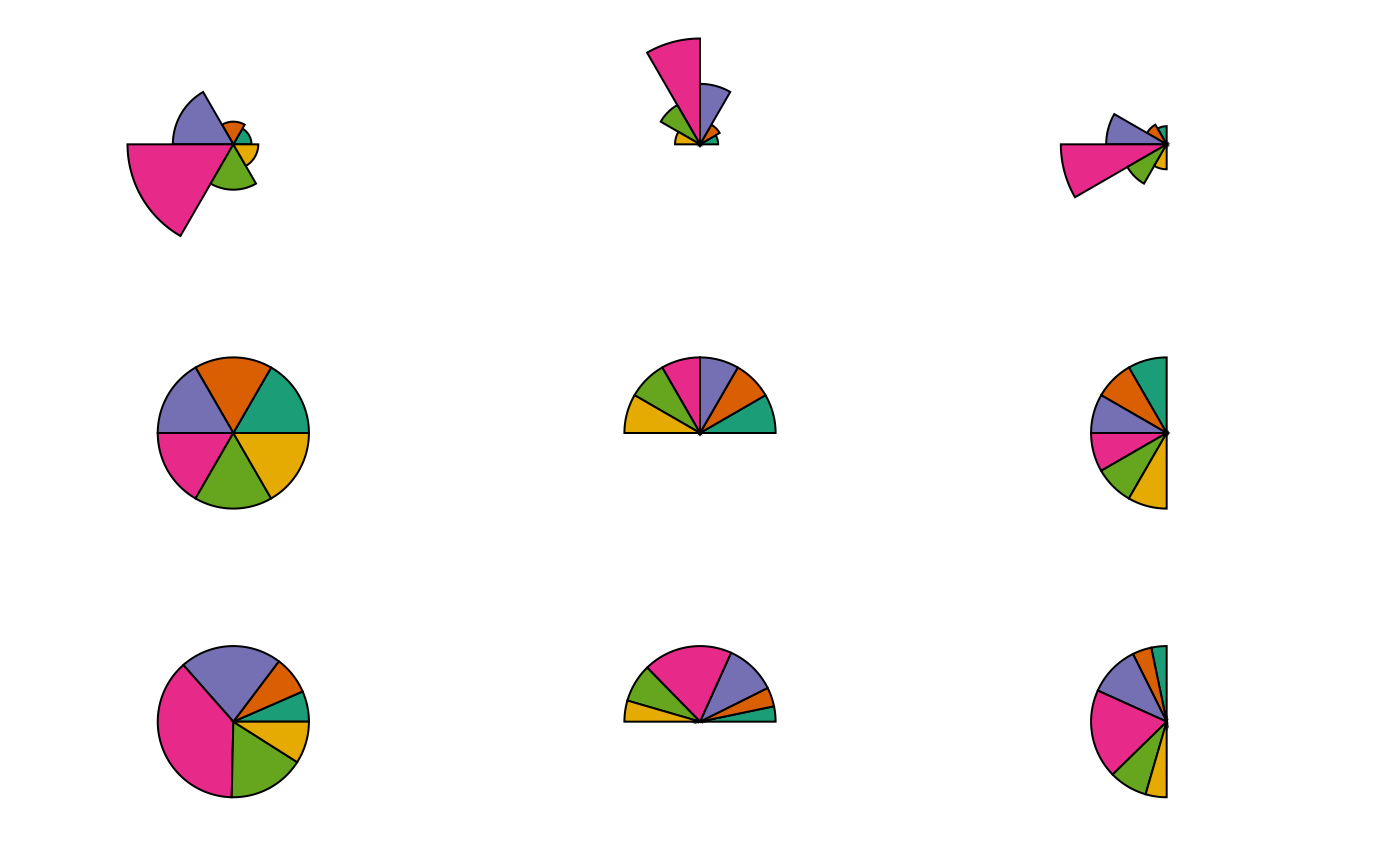
# Multivariate fill colour
#~~~~~~~~~~~~~~~~~~~~~~~~~~~~~~~~~~~~~~~~~~~~~~~~~~~~~~~~~~~~~~~~~~~~~~~~~~~~
pg1 <- pieglyphGrob(x = unit(0.5, "npc"), y = unit(0.5, "npc"),
z = c(0.24, 0.3, 0.8, 1.4, 0.6, 0.33), size = 10,
fill = RColorBrewer::brewer.pal(6, "Dark2"))
pg2 <- pieglyphGrob(x = unit(0.5, "npc"), y = unit(0.5, "npc"),
z = c(0.24, 0.3, 0.8, 1.4, 0.6, 0.33), size = 10,
angle.start = 0, angle.stop = base::pi,
fill = RColorBrewer::brewer.pal(6, "Dark2"))
pg3 <- pieglyphGrob(x = unit(0.5, "npc"), y = unit(0.5, "npc"),
z = c(0.24, 0.3, 0.8, 1.4, 0.6, 0.33), size = 10,
angle.start = 90 * (base::pi/180),
angle.stop = 270 * (base::pi/180),
fill = RColorBrewer::brewer.pal(6, "Dark2"))
pg4 <- pieglyphGrob(x = unit(0.5, "npc"), y = unit(0.5, "npc"),
z = c(0.24, 0.3, 0.8, 1.4, 0.6, 0.33), size = 10,
scale.radius = FALSE,
fill = RColorBrewer::brewer.pal(6, "Dark2"))
pg5 <- pieglyphGrob(x = unit(0.5, "npc"), y = unit(0.5, "npc"),
z = c(0.24, 0.3, 0.8, 1.4, 0.6, 0.33), size = 10,
scale.radius = FALSE,
angle.start = 0, angle.stop = base::pi,
fill = RColorBrewer::brewer.pal(6, "Dark2"))
pg6 <- pieglyphGrob(x = unit(0.5, "npc"), y = unit(0.5, "npc"),
z = c(0.24, 0.3, 0.8, 1.4, 0.6, 0.33), size = 10,
scale.radius = FALSE,
angle.start = 90 * (base::pi/180),
angle.stop = 270 * (base::pi/180),
fill = RColorBrewer::brewer.pal(6, "Dark2"))
pg7 <- pieglyphGrob(x = unit(0.5, "npc"), y = unit(0.5, "npc"),
z = c(0.24, 0.3, 0.8, 1.4, 0.6, 0.33), size = 10,
scale.segment = TRUE, scale.radius = FALSE,
fill = RColorBrewer::brewer.pal(6, "Dark2"))
pg8 <- pieglyphGrob(x = unit(0.5, "npc"), y = unit(0.5, "npc"),
z = c(0.24, 0.3, 0.8, 1.4, 0.6, 0.33), size = 10,
scale.segment = TRUE, scale.radius = FALSE,
angle.start = 0, angle.stop = base::pi,
fill = RColorBrewer::brewer.pal(6, "Dark2"))
pg9 <- pieglyphGrob(x = unit(0.5, "npc"), y = unit(0.5, "npc"),
z = c(0.24, 0.3, 0.8, 1.4, 0.6, 0.33), size = 10,
scale.segment = TRUE, scale.radius = FALSE,
angle.start = 90 * (base::pi/180),
angle.stop = 270 * (base::pi/180),
fill = RColorBrewer::brewer.pal(6, "Dark2"))
grid.arrange(pg1, pg2, pg3, pg4, pg5, pg6, pg7, pg8, pg9,
nrow = 3, ncol = 3)
#~~~~~~~~~~~~~~~~~~~~~~~~~~~~~~~~~~~~~~~~~~~~~~~~~~~~~~~~~~~~~~~~~~~~~~~~~~~~
# Multivariate fill colour
#~~~~~~~~~~~~~~~~~~~~~~~~~~~~~~~~~~~~~~~~~~~~~~~~~~~~~~~~~~~~~~~~~~~~~~~~~~~~
pg1 <- pieglyphGrob(x = unit(0.5, "npc"), y = unit(0.5, "npc"),
z = c(0.24, 0.3, 0.8, 1.4, 0.6, 0.33), size = 10,
fill = RColorBrewer::brewer.pal(6, "Dark2"))
pg2 <- pieglyphGrob(x = unit(0.5, "npc"), y = unit(0.5, "npc"),
z = c(0.24, 0.3, 0.8, 1.4, 0.6, 0.33), size = 10,
angle.start = 0, angle.stop = base::pi,
fill = RColorBrewer::brewer.pal(6, "Dark2"))
pg3 <- pieglyphGrob(x = unit(0.5, "npc"), y = unit(0.5, "npc"),
z = c(0.24, 0.3, 0.8, 1.4, 0.6, 0.33), size = 10,
angle.start = 90 * (base::pi/180),
angle.stop = 270 * (base::pi/180),
fill = RColorBrewer::brewer.pal(6, "Dark2"))
pg4 <- pieglyphGrob(x = unit(0.5, "npc"), y = unit(0.5, "npc"),
z = c(0.24, 0.3, 0.8, 1.4, 0.6, 0.33), size = 10,
scale.radius = FALSE,
fill = RColorBrewer::brewer.pal(6, "Dark2"))
pg5 <- pieglyphGrob(x = unit(0.5, "npc"), y = unit(0.5, "npc"),
z = c(0.24, 0.3, 0.8, 1.4, 0.6, 0.33), size = 10,
scale.radius = FALSE,
angle.start = 0, angle.stop = base::pi,
fill = RColorBrewer::brewer.pal(6, "Dark2"))
pg6 <- pieglyphGrob(x = unit(0.5, "npc"), y = unit(0.5, "npc"),
z = c(0.24, 0.3, 0.8, 1.4, 0.6, 0.33), size = 10,
scale.radius = FALSE,
angle.start = 90 * (base::pi/180),
angle.stop = 270 * (base::pi/180),
fill = RColorBrewer::brewer.pal(6, "Dark2"))
pg7 <- pieglyphGrob(x = unit(0.5, "npc"), y = unit(0.5, "npc"),
z = c(0.24, 0.3, 0.8, 1.4, 0.6, 0.33), size = 10,
scale.segment = TRUE, scale.radius = FALSE,
fill = RColorBrewer::brewer.pal(6, "Dark2"))
pg8 <- pieglyphGrob(x = unit(0.5, "npc"), y = unit(0.5, "npc"),
z = c(0.24, 0.3, 0.8, 1.4, 0.6, 0.33), size = 10,
scale.segment = TRUE, scale.radius = FALSE,
angle.start = 0, angle.stop = base::pi,
fill = RColorBrewer::brewer.pal(6, "Dark2"))
pg9 <- pieglyphGrob(x = unit(0.5, "npc"), y = unit(0.5, "npc"),
z = c(0.24, 0.3, 0.8, 1.4, 0.6, 0.33), size = 10,
scale.segment = TRUE, scale.radius = FALSE,
angle.start = 90 * (base::pi/180),
angle.stop = 270 * (base::pi/180),
fill = RColorBrewer::brewer.pal(6, "Dark2"))
grid.arrange(pg1, pg2, pg3, pg4, pg5, pg6, pg7, pg8, pg9,
nrow = 3, ncol = 3)
 #~~~~~~~~~~~~~~~~~~~~~~~~~~~~~~~~~~~~~~~~~~~~~~~~~~~~~~~~~~~~~~~~~~~~~~~~~~~~
# Adjust line join style
#~~~~~~~~~~~~~~~~~~~~~~~~~~~~~~~~~~~~~~~~~~~~~~~~~~~~~~~~~~~~~~~~~~~~~~~~~~~~
pg1 <- pieglyphGrob(x = unit(0.5, "npc"), y = unit(0.5, "npc"),
z = c(0.24, 0.3, 0.8, 1.4, 0.6, 0.33),
size = 15, lwd = 5)
pg2 <- pieglyphGrob(x = unit(0.5, "npc"), y = unit(0.5, "npc"),
z = c(0.24, 0.3, 0.8, 1.4, 0.6, 0.33),
size = 15, lwd = 5, linejoin = "round")
pg3 <- pieglyphGrob(x = unit(0.5, "npc"), y = unit(0.5, "npc"),
z = c(0.24, 0.3, 0.8, 1.4, 0.6, 0.33),
size = 15, lwd = 5, linejoin = "bevel")
grid.arrange(pg1, pg2, pg3, nrow = 1, ncol = 3)
#~~~~~~~~~~~~~~~~~~~~~~~~~~~~~~~~~~~~~~~~~~~~~~~~~~~~~~~~~~~~~~~~~~~~~~~~~~~~
# Adjust line join style
#~~~~~~~~~~~~~~~~~~~~~~~~~~~~~~~~~~~~~~~~~~~~~~~~~~~~~~~~~~~~~~~~~~~~~~~~~~~~
pg1 <- pieglyphGrob(x = unit(0.5, "npc"), y = unit(0.5, "npc"),
z = c(0.24, 0.3, 0.8, 1.4, 0.6, 0.33),
size = 15, lwd = 5)
pg2 <- pieglyphGrob(x = unit(0.5, "npc"), y = unit(0.5, "npc"),
z = c(0.24, 0.3, 0.8, 1.4, 0.6, 0.33),
size = 15, lwd = 5, linejoin = "round")
pg3 <- pieglyphGrob(x = unit(0.5, "npc"), y = unit(0.5, "npc"),
z = c(0.24, 0.3, 0.8, 1.4, 0.6, 0.33),
size = 15, lwd = 5, linejoin = "bevel")
grid.arrange(pg1, pg2, pg3, nrow = 1, ncol = 3)
 #~~~~~~~~~~~~~~~~~~~~~~~~~~~~~~~~~~~~~~~~~~~~~~~~~~~~~~~~~~~~~~~~~~~~~~~~~~~~
# Adjust grid levels (when scale.radius = TRUE)
#~~~~~~~~~~~~~~~~~~~~~~~~~~~~~~~~~~~~~~~~~~~~~~~~~~~~~~~~~~~~~~~~~~~~~~~~~~~~
# Grid levels
gl <- split(x = c(rep(c(1, 2, 3), 4),
rep(c(1, 2, 3, 4), 2)),
f = c(rep(1:4, each = 3),
rep(5:6, each = 4)))
gl
#> $`1`
#> [1] 1 2 3
#>
#> $`2`
#> [1] 1 2 3
#>
#> $`3`
#> [1] 1 2 3
#>
#> $`4`
#> [1] 1 2 3
#>
#> $`5`
#> [1] 1 2 3 4
#>
#> $`6`
#> [1] 1 2 3 4
#>
pg1 <- pieglyphGrob(x = unit(0.5, "npc"), y = unit(0.5, "npc"),
z = c(1, 3, 2, 1, 2, 3), size = 5,
draw.grid = TRUE, grid.levels = gl,
lwd = 2, col.grid = "black")
pg2 <- pieglyphGrob(x = unit(0.5, "npc"), y = unit(0.5, "npc"),
angle.start = 0, angle.stop = base::pi,
z = c(1, 3, 2, 1, 2, 3), size = 5,
draw.grid = TRUE, grid.levels = gl,
lwd = 2, col.grid = "black")
grid.arrange(pg1, pg2, ncol = 2)
#~~~~~~~~~~~~~~~~~~~~~~~~~~~~~~~~~~~~~~~~~~~~~~~~~~~~~~~~~~~~~~~~~~~~~~~~~~~~
# Adjust grid levels (when scale.radius = TRUE)
#~~~~~~~~~~~~~~~~~~~~~~~~~~~~~~~~~~~~~~~~~~~~~~~~~~~~~~~~~~~~~~~~~~~~~~~~~~~~
# Grid levels
gl <- split(x = c(rep(c(1, 2, 3), 4),
rep(c(1, 2, 3, 4), 2)),
f = c(rep(1:4, each = 3),
rep(5:6, each = 4)))
gl
#> $`1`
#> [1] 1 2 3
#>
#> $`2`
#> [1] 1 2 3
#>
#> $`3`
#> [1] 1 2 3
#>
#> $`4`
#> [1] 1 2 3
#>
#> $`5`
#> [1] 1 2 3 4
#>
#> $`6`
#> [1] 1 2 3 4
#>
pg1 <- pieglyphGrob(x = unit(0.5, "npc"), y = unit(0.5, "npc"),
z = c(1, 3, 2, 1, 2, 3), size = 5,
draw.grid = TRUE, grid.levels = gl,
lwd = 2, col.grid = "black")
pg2 <- pieglyphGrob(x = unit(0.5, "npc"), y = unit(0.5, "npc"),
angle.start = 0, angle.stop = base::pi,
z = c(1, 3, 2, 1, 2, 3), size = 5,
draw.grid = TRUE, grid.levels = gl,
lwd = 2, col.grid = "black")
grid.arrange(pg1, pg2, ncol = 2)
 #~~~~~~~~~~~~~~~~~~~~~~~~~~~~~~~~~~~~~~~~~~~~~~~~~~~~~~~~~~~~~~~~~~~~~~~~~~~~
# Adjust grid level colours (when scale.radius = TRUE)
#~~~~~~~~~~~~~~~~~~~~~~~~~~~~~~~~~~~~~~~~~~~~~~~~~~~~~~~~~~~~~~~~~~~~~~~~~~~~
# Grid levels
gl <- split(x = c(rep(c(1, 2, 3), 4),
rep(c(1, 2, 3, 4), 2)),
f = c(rep(1:4, each = 3),
rep(5:6, each = 4)))
gl
#> $`1`
#> [1] 1 2 3
#>
#> $`2`
#> [1] 1 2 3
#>
#> $`3`
#> [1] 1 2 3
#>
#> $`4`
#> [1] 1 2 3
#>
#> $`5`
#> [1] 1 2 3 4
#>
#> $`6`
#> [1] 1 2 3 4
#>
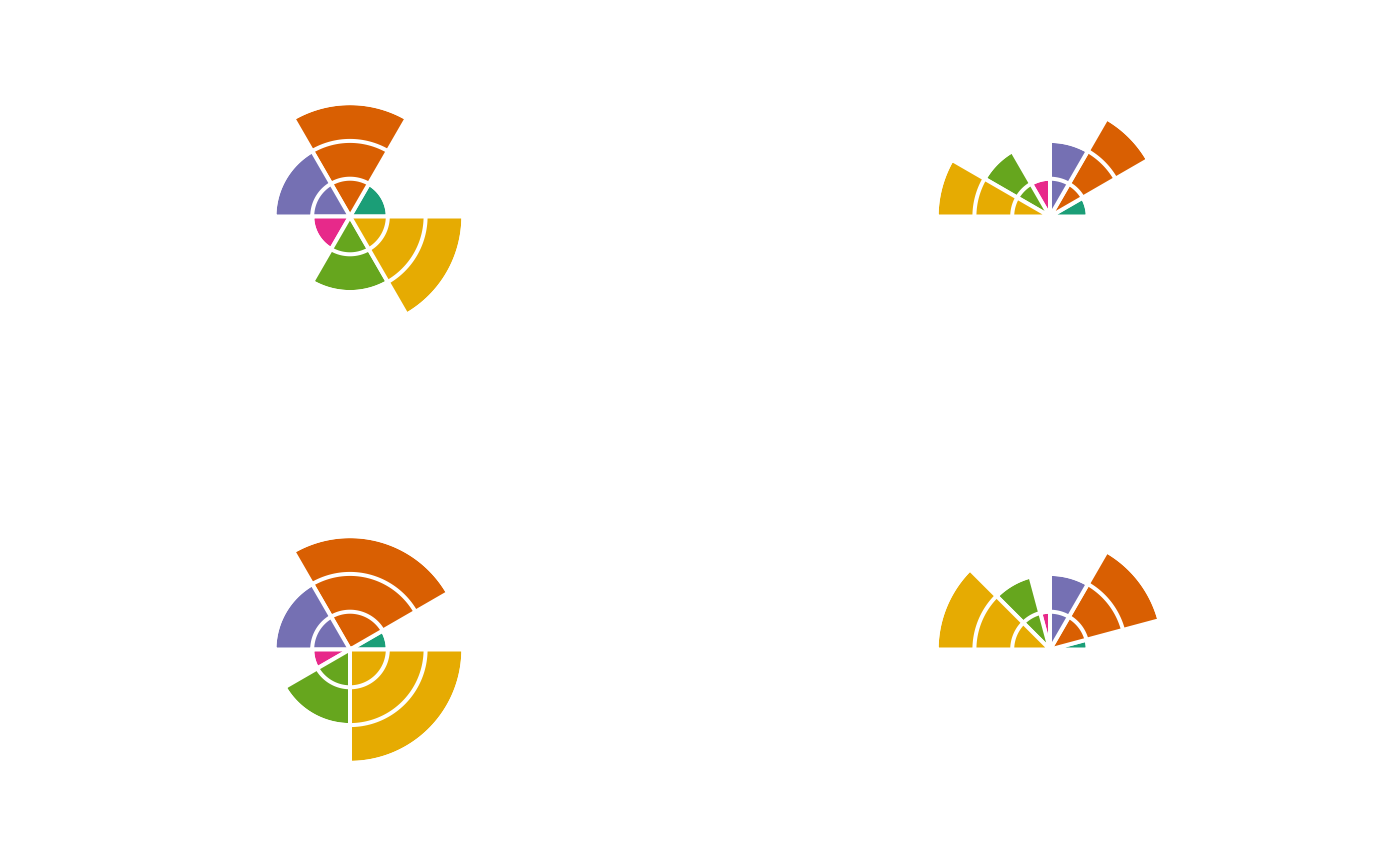
pg1 <- pieglyphGrob(x = unit(0.5, "npc"), y = unit(0.5, "npc"),
z = c(1, 3, 2, 1, 2, 3), size = 5,
draw.grid = TRUE, grid.levels = gl,
lwd = 2, col = "white", col.grid = "white",
fill = RColorBrewer::brewer.pal(6, "Dark2"))
pg2 <- pieglyphGrob(x = unit(0.5, "npc"), y = unit(0.5, "npc"),
angle.start = 0, angle.stop = base::pi,
z = c(1, 3, 2, 1, 2, 3), size = 5,
draw.grid = TRUE, grid.levels = gl,
lwd = 2, col = "white", col.grid = "white",
fill = RColorBrewer::brewer.pal(6, "Dark2"))
grid.arrange(pg1, pg2, ncol = 2)
#~~~~~~~~~~~~~~~~~~~~~~~~~~~~~~~~~~~~~~~~~~~~~~~~~~~~~~~~~~~~~~~~~~~~~~~~~~~~
# Adjust grid level colours (when scale.radius = TRUE)
#~~~~~~~~~~~~~~~~~~~~~~~~~~~~~~~~~~~~~~~~~~~~~~~~~~~~~~~~~~~~~~~~~~~~~~~~~~~~
# Grid levels
gl <- split(x = c(rep(c(1, 2, 3), 4),
rep(c(1, 2, 3, 4), 2)),
f = c(rep(1:4, each = 3),
rep(5:6, each = 4)))
gl
#> $`1`
#> [1] 1 2 3
#>
#> $`2`
#> [1] 1 2 3
#>
#> $`3`
#> [1] 1 2 3
#>
#> $`4`
#> [1] 1 2 3
#>
#> $`5`
#> [1] 1 2 3 4
#>
#> $`6`
#> [1] 1 2 3 4
#>
pg1 <- pieglyphGrob(x = unit(0.5, "npc"), y = unit(0.5, "npc"),
z = c(1, 3, 2, 1, 2, 3), size = 5,
draw.grid = TRUE, grid.levels = gl,
lwd = 2, col = "white", col.grid = "white",
fill = RColorBrewer::brewer.pal(6, "Dark2"))
pg2 <- pieglyphGrob(x = unit(0.5, "npc"), y = unit(0.5, "npc"),
angle.start = 0, angle.stop = base::pi,
z = c(1, 3, 2, 1, 2, 3), size = 5,
draw.grid = TRUE, grid.levels = gl,
lwd = 2, col = "white", col.grid = "white",
fill = RColorBrewer::brewer.pal(6, "Dark2"))
grid.arrange(pg1, pg2, ncol = 2)